VLANs in MikroTik are better implemented using Bridge VLAN Filtering, rather than through chaotic mixing of VLAN interfaces with physical ports. This reduces the risk of errors and better aligns with modern RouterOS.
Key Concepts
- tagged — a trunk port, through which VLAN traffic flows with a tag.
- untagged — an access port for a regular device without VLAN tags.
- PVID — the VLAN ID that the bridge assigns to incoming untagged traffic on an access port.
- CPU port — the bridge itself. It must be added as tagged if the router needs to route or manage VLANs.
Example: guest VLAN 20 on ether3, trunk on ether5
/interface bridge add name=bridge vlan-filtering=no
/interface bridge port
add bridge=bridge interface=ether2 pvid=1
add bridge=bridge interface=ether3 pvid=20
add bridge=bridge interface=ether5
/interface bridge vlan
add bridge=bridge vlan-ids=1 tagged=bridge,ether5 untagged=ether2
add bridge=bridge vlan-ids=20 tagged=bridge,ether5 untagged=ether3
/interface vlan add name=vlan20-guest interface=bridge vlan-id=20
/ip address add address=192.168.20.1/24 interface=vlan20-guest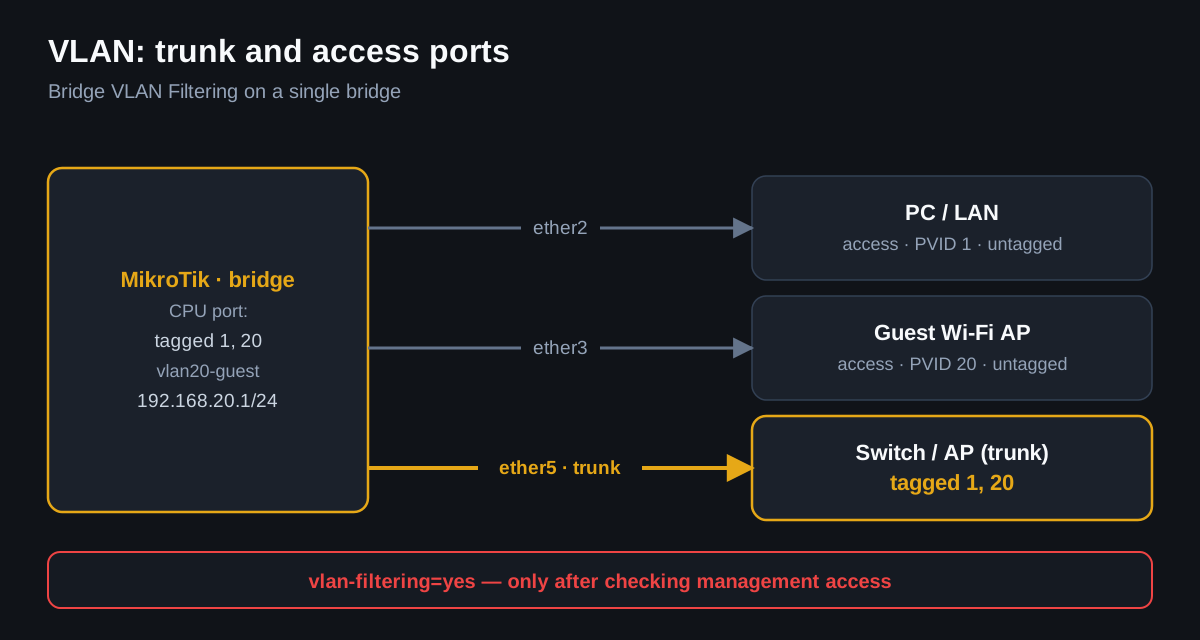
Enable filtering only after verification
/interface bridge vlan print
/interface bridge port print
/interface bridge set bridge vlan-filtering=yes
Winbox path
- Bridge → Ports: set PVID for access ports.
- Bridge → VLANs: add VLAN ID, tagged trunk and bridge, untagged access ports.
- Interfaces → VLAN: create an L3 VLAN interface on the bridge.
- IP → Addresses: add a gateway for the VLAN.
- Only after this, enable vlan-filtering.
Most common dangerous mistake
Enabling vlan-filtering=yes without management access. You may lose Winbox/SSH if the bridge/CPU port is not included in the required VLAN.
For SDS objects, it is desirable to have separate VLANs for LAN, guest, CCTV/IoT, and management. Cameras and guests should not be able to see accounting PCs or servers.