Many articles about smart homes are written in the format "buy a light bulb – and you'll be happy". This series is about something different: how to build a system that works for years, doesn't depend on a third-party cloud, and genuinely saves money. Everything described below, we first implemented for ourselves, and only then started installing for clients.
Why Home Assistant, not a manufacturer's app
A typical "out-of-the-box smart home" scenario looks like this: each brand has its own app, its own account, and its own cloud server. Five manufacturers mean five apps, and none can communicate with another. And when a manufacturer shuts down a service or changes terms, your devices turn into ordinary switches.
Home Assistant is an open platform that runs on your own server at home. It communicates with equipment from over 2000 manufacturers and unifies everything into a single interface and automation logic.
- Local control. Automations work even when the internet is down. Light triggered by a presence sensor should not depend on a data center.
- No subscription. The platform is free, and data stays at home.
- One scenario for all brands. A Zigbee sensor can turn on a Wi-Fi relay and send notifications to Telegram – they don't even know about each other.
- Transparency. Every entity, every state, and every trigger is visible in the log.
The price for this is setup time. Home Assistant is not "set it and forget it": it requires an understanding of what you are doing. That's why we are writing this series.
What the system consists of
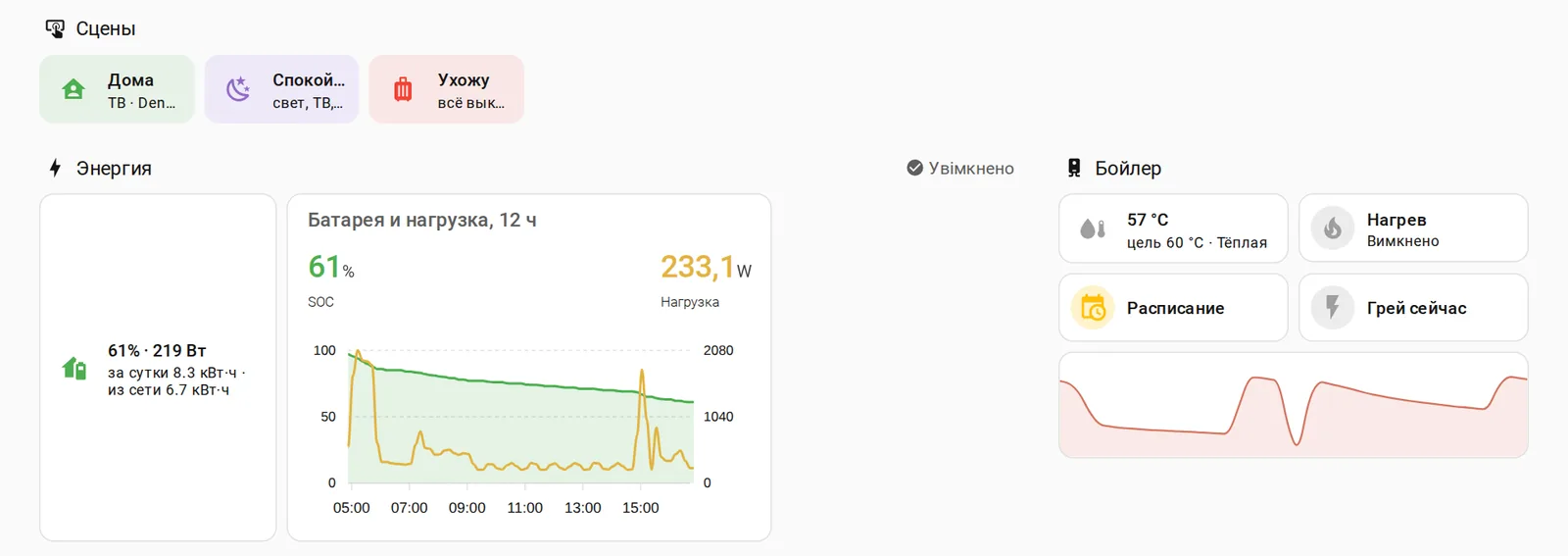
What works for us daily, 24/7:
| Subsystem | What it does | Based on |
|---|---|---|
| Server | System brain, stores history, runs automations | Home Assistant OS on mini-PC |
| Energy | Hybrid inverter and battery management, tariff zone accounting | Modbus RS-485 + MQTT |
| Presence | Who is home, in which room, whether there is movement | Router, mmWave radars, BLE |
| Lighting | Scenarios based on illumination and presence, RGB lighting | ESPHome, Zigbee, Tuya |
| Climate and Water | Boiler based on tariff and remaining battery charge, air conditioners | Relays, IR blaster |
| Security | Security alarm, video surveillance | Ajax, IP cameras |
| Notifications | What's important – to Telegram, the rest – to the app | HA + Telegram bot |
Architecture: four levels
Any working smart home system is built from the bottom up. Skipping a level won't work — or rather, it will, but then you'll have to redo it.
1. Server
Hardware and Home Assistant OS. Two decisions are made here that are difficult to change later: what to run the system on and how to perform backups. An error at this level is the most costly.
2. Integrations
Connecting what's already there: router, inverter, security system, TV, existing Wi-Fi and Zigbee devices. At this stage, the system begins to see the house, but doesn't do anything by itself yet.
3. Custom Sensors
Where off-the-shelf devices don't exist or are poor, we install our own — based on ESP32 with ESPHome. Presence radar, illuminance measurement, current control, LED strip management. This is the most interesting part and the biggest source of pitfalls.
4. Interface and Logic
Dashboards, scenarios, notifications. The level at which the system transforms from a collection of sensors into something the family uses, not just the person who assembled it.
What this provides in numbers
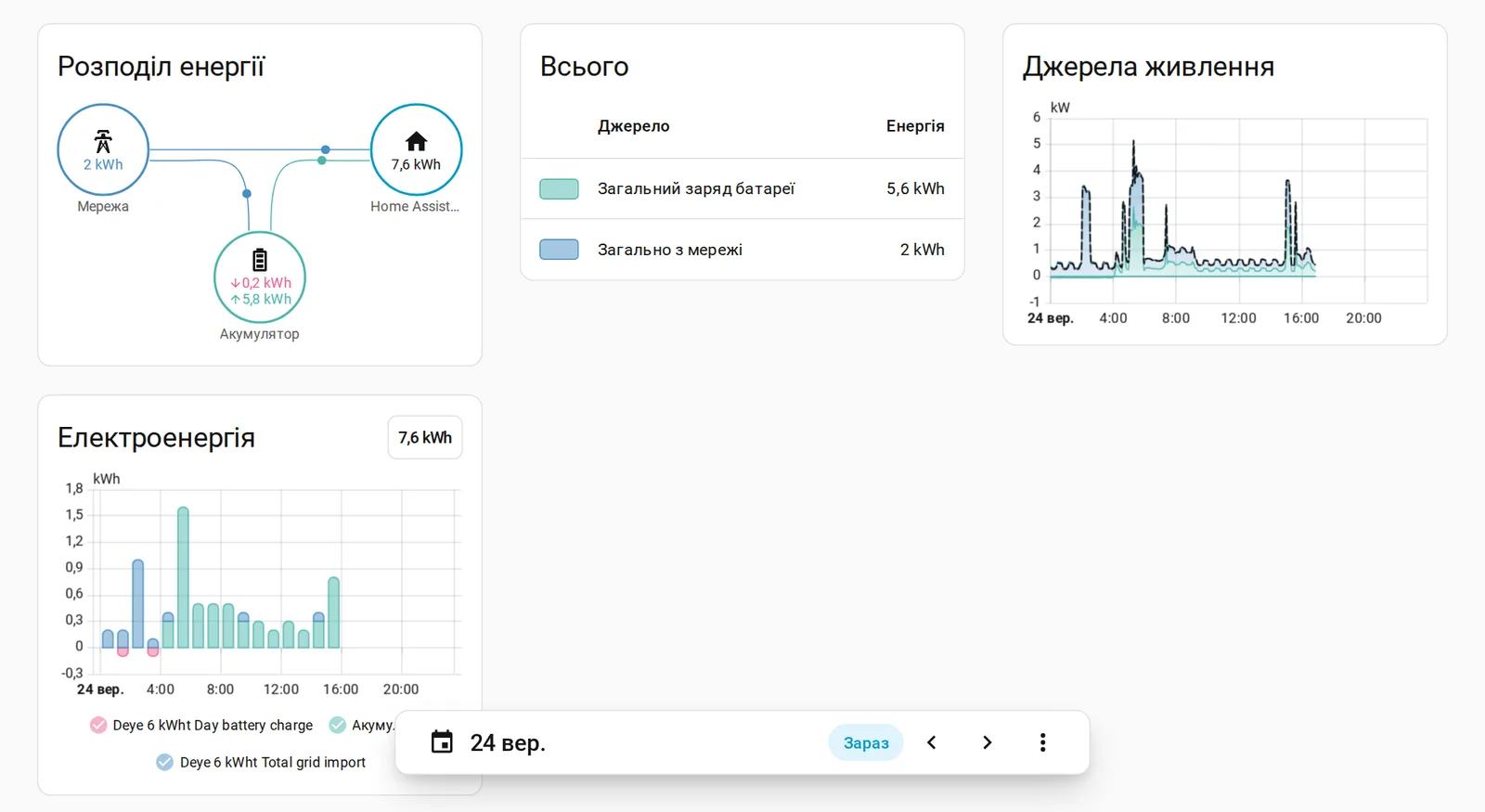
The most illustrative example is energy. A hybrid inverter with a battery is useful on its own, but without smart control, it operates "as it happens". After shifting grid charging to the night tariff and transferring the daytime load to the battery:
| Indicator | Before automation | After |
|---|---|---|
| Grid consumption | ≈12.8 kWh/day | ≈4.7 kWh/day |
| Share consumed at night tariff | random | almost all |
This is approximately 63% of daily grid consumption, shifted either to the battery or to a tariff twice as cheap. The equipment is the same — only the control logic changed.
A second example is less obvious: the boiler. It heats not "on schedule", but when there is surplus energy and the remaining battery charge allows. The difference in hot water costs is of the same order.
Principles that proved themselves
We derived these rules from our own mistakes, and they save the most time:
- One step — one check. Don't change five things at once. When something breaks, you won't know what it was.
- A physical test is more important than theory. «It should work» is not a result. The result is when you pressed and saw.
- Backup before every config edit. And configuration check afterwards. These are five seconds that save an evening.
- Automations by metrics, not by clock. Lights turn on based on actual illuminance, not «at 19:00» — 19:00 looks different in winter and summer.
- Function is more important than beauty. A dashboard that is used is better than a dashboard that looks good in a screenshot.
- Log everything from day one. The history of metrics is what normal scenarios are built upon later.
Series of step-by-step instructions
The overview is a map. The routes themselves are in the knowledge base, each part is self-contained:
- Server: what hardware to choose, how installation methods differ, how to install Home Assistant OS, and what to do in the first half hour.
- Basic setup and first integrations: risk-free configuration work, MQTT broker, presence via router, inverter connection, and tariff-based accounting.
- Custom sensors and LED controllers on ESPHome: presence radars, illuminance measurement, strip control — and why framework choice depends on the chip.
- Control panel: dashboards that are actually used, and energy accounting.
- Utilities: voice assistants, smart plug for a boiler, well-thought-out notification system.
Who this is for
If you are ready to figure it out — Home Assistant will give you a system that cannot be bought in a store. If you don't have time, but need a result — we design and install such systems turnkey: from the electrical panel and cable to configured scenarios and family training. Engineer's visit — from 1,500 ₴ in Kyiv, when ordering works, the amount is credited towards their cost.