When a person first chooses smart switches or sensors, they see unfamiliar words on the boxes: Zigbee, Wi-Fi, Thread, Matter, Z-Wave, Bluetooth, LoRa. The protocol you choose determines how long the sensor's battery will last, whether the signal will reach the garage, whether everything will work without internet, and what will happen to the system during a power outage. We break down each protocol in simple terms: how it works, where it's best, and which brands and bridges to use with it.
If you're just starting, first check out "Smart Home: Where to Start". This article is specifically about the "language" devices use to communicate with each other.
Briefly: What to Use Where
- Zigbee — the foundation for sensors, buttons, and switches in apartments and houses: inexpensive, batteries last 1–2 years, huge selection.
- Wi-Fi — for devices powered by 230 V mains: relays, sockets, controllers. Poorly suited for battery-powered sensors.
- Thread and Matter — a new standard uniting Apple, Google, Amazon, and Samsung. Promising, but the device selection is still smaller.
- Z-Wave — reliable, better penetrates walls, but more expensive and narrower selection.
- Bluetooth LE — small sensors and buttons near the bridge.
- LoRa / LoRaWAN — kilometers: plot, cottage, warehouse, meters, greenhouses.
- Wired KNX and RS-485 — for new construction where reliability is more important than price.
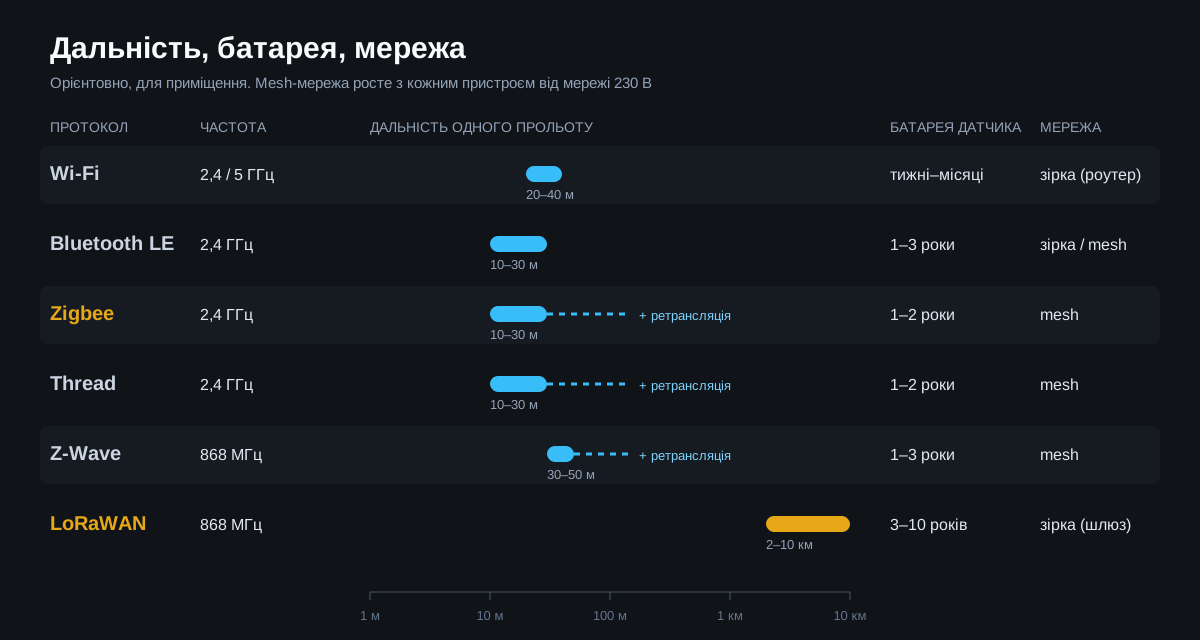
Wi-Fi: Simple, but Power-Hungry
Each Wi-Fi device connects directly to your router — no separate bridge is needed. This is the simplest path: buy a socket, add it to the app, and it works. The speed is high, so Wi-Fi is suitable for both cameras and devices that transmit a lot of data.
The downsides are also obvious. A Wi-Fi module consumes a lot of power, so battery-powered sensors last weeks or months, not years. Twenty to thirty devices noticeably strain a typical home router. And many inexpensive Wi-Fi devices only work via the manufacturer's cloud: if the internet disappears, control is lost.
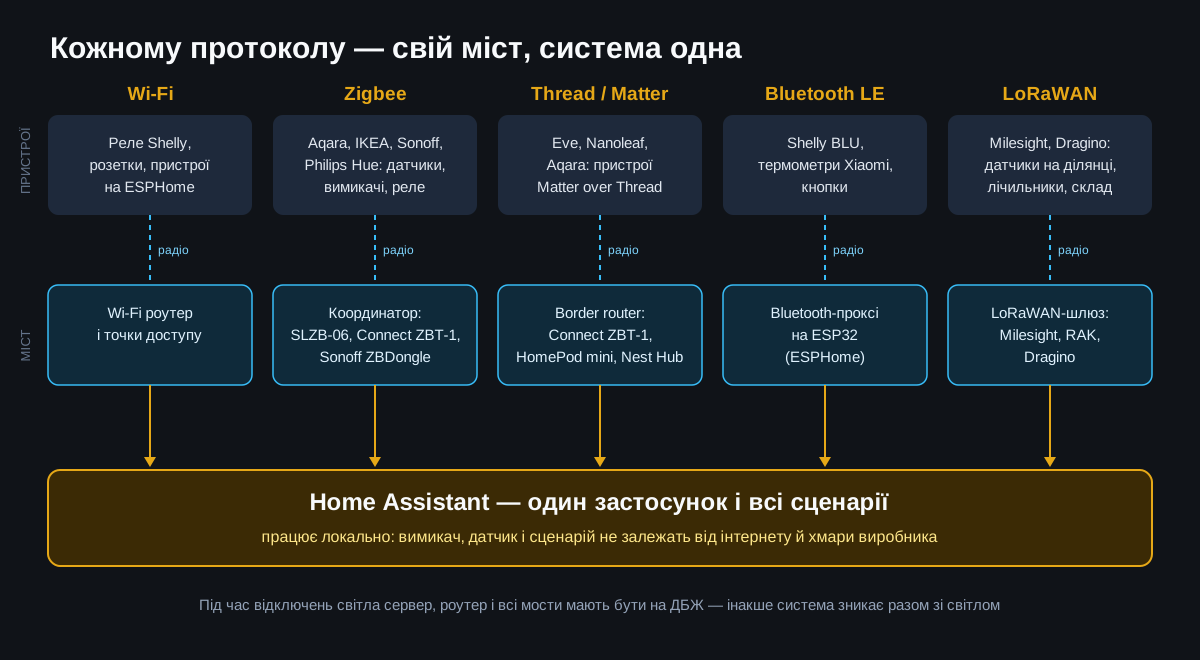
Where to use: relays in wall boxes and distribution boards, smart sockets, lighting, climate, and gate controllers — everything powered by 230 V. Brands: Shelly (relays, energy meters, work locally without cloud), Sonoff, ESPHome devices. Bridge: not needed, but a good Wi-Fi network is required — access points and network configuration can help with this.
Zigbee: The Workhorse of the Smart Home
Zigbee was created specifically for smart devices: low data, minimal energy. A motion or door opening sensor on a CR2032 battery works for one to two years. The main advantage is a mesh network: every device powered by 230 V mains (relay, socket, lamp) transmits the signal further. The more such devices, the larger and more reliable the network.
Zigbee operates on the same 2.4 GHz as Wi-Fi, so a separate bridge — a coordinator — is needed. The selection of devices is vast and inexpensive: temperature, leak, smoke, motion, opening sensors, buttons, switches, relays, blinds.
Device brands: Aqara, IKEA, Philips Hue, Sonoff, Tuya. Bridges: proprietary hubs (Aqara Hub, IKEA Dirigera, Philips Hue Bridge) primarily work with their own devices. Universal coordinators work with devices of any brand via Home Assistant: SMLIGHT SLZB-06 (connects via Ethernet cable and is PoE-powered, so it can be placed in the center of the house), Home Assistant Connect ZBT-1, Sonoff ZBDongle.
Where to use: apartment, private house, office — sensors, buttons, switches, lighting and heating control.
Z-Wave: Reliable, but More Expensive
Z-Wave also builds a mesh network but operates at a frequency of approximately 868 MHz. The lower frequency penetrates concrete and brick better, and there is no competition with Wi-Fi in the air. Devices from different brands are certified for compatibility, so they work better together.
Downsides: devices are noticeably more expensive than Zigbee, the selection is smaller, and the frequency depends on the region. For Ukraine, choose European versions at 868 MHz — American devices at 908 MHz will not work with a European controller.
Brands: Fibaro, Aeotec. Bridge: Z-Wave controller (e.g., Aeotec or Zooz USB stick for Home Assistant) or a proprietary Fibaro Home Center hub.
Where to use: houses with thick walls where Zigbee doesn't reach, and objects where stability is more important than price.
Thread and Matter: The New Common Standard
These two words are often confused. Thread is a radio protocol similar to Zigbee: 2.4 GHz, mesh, low energy, but IP-based, like the internet. Matter is not a radio, but a common "language" for devices that works over Thread, Wi-Fi, or Ethernet. A device marked Matter can be added to Apple Home, Google Home, Amazon Alexa, SmartThings, or Home Assistant — without being tied to a single manufacturer.
More details about Matter and local control can be found in the article "Smart Home in 2026: Matter".
Brands: Eve, Nanoleaf, Aqara (new models), IKEA (new lineup). Bridge (border router): Apple HomePod mini or Apple TV 4K, Google Nest Hub, Home Assistant Connect ZBT-1.
Where to install: where an Apple or Google ecosystem already exists and you want everything to "just work". For a large project today, we increasingly choose Zigbee — there are more devices, they are cheaper, and there are more proven solutions.
Bluetooth LE: small sensors nearby
Bluetooth Low Energy consumes very little, so thermometers and buttons on it work for years. But the range is small — one or two rooms, and the signal is usually not retransmitted.
The solution is a Bluetooth proxy: a small ESP32 board with ESPHome firmware that catches nearby Bluetooth sensors and transmits them to Home Assistant via Wi-Fi. Several such proxies cover the entire house.
Brands: Shelly BLU (buttons, door, temperature, and motion sensors), Xiaomi thermometers. Where to install: room temperature and humidity, bedside buttons, simple sensors where a proxy already exists.
LoRa and LoRaWAN: kilometers instead of meters
LoRa is a radio for long distances: from several hundred meters in dense urban areas to kilometers in open terrain. A sensor sends a small data packet every few minutes, and the battery lasts for years. LoRaWAN is a network standard on top of LoRa: sensors transmit data to a gateway, which then sends it to a server.
The price for range is very low speed and delays. LoRa is not for light switches: you press it and wait. It's for measurements that simply need to arrive regularly.
Brands: Milesight (temperature, humidity, leak sensors, meters), Dragino, RAK Wireless. Bridge: LoRaWAN gateway (Milesight, RAK, Dragino) and a network server — either built into the gateway or separate, with data from it going to Home Assistant.
Where to install: large plot, cottage with outbuildings, well and pump station far from the house, warehouses, greenhouses, water meter readings.
Others: 433 MHz, Ajax, EnOcean, wired
- Simple 433/868 MHz radio — cheap remotes, doorbells, and sensors. The signal usually goes one way without confirmation and with almost no protection. Do not use for security.
- Security systems like Ajax have their own secure radio protocol (Jeweller). This is a separate security system; it is linked to a smart home through integration.
- EnOcean — batteryless switches: the press itself generates energy. A niche but good solution for walls where you don't want to change batteries. Brands: Eltako, PEHA.
- Wired KNX and RS-485/Modbus — the most reliable, but cables are laid during the renovation phase. Ideal for a new house and electrical panels.
Comparison table
| Protocol | Range (single link) | Sensor battery | Network | Bridge | Best for |
|---|---|---|---|---|---|
| Wi-Fi | 20–40 m | weeks–months | star | router | relays, sockets from 230 V |
| Zigbee | 10–30 m + mesh | 1–2 years | mesh | coordinator | sensors, buttons, switches |
| Z-Wave | 30–50 m + mesh | 1–3 years | mesh | Z-Wave controller | thick walls, reliability |
| Thread / Matter | 10–30 m + mesh | 1–2 years | mesh | border router | Apple, Google ecosystems |
| Bluetooth LE | 10–30 m | 1–3 years | star | Bluetooth proxy | thermometers, buttons |
| LoRaWAN | kilometers | 3–10 years | star | gateway | plots, warehouses, meters |
How to assemble this into one system
Devices of different protocols can and should be mixed — but through a single hub. We build systems on Home Assistant: each protocol connects through its own bridge, and scenarios, the application, and history are all in one place. Scenarios run locally, so lights turn on even without internet.
Power outages: what is forgotten
In a mesh network, the signal is transmitted by 230 V devices: relays, sockets, lamps. When the power goes out, they turn off, and battery-powered sensors lose their path to the coordinator. The system "goes blind" precisely when it is most needed — to detect leaks or temperature in the boiler room.
- Power the server, router, and all bridges from a UPS or a backup power system.
- For mesh, add several routers from a protected line: Zigbee relays in the electrical panel on a backup line or separate repeaters near the UPS.
- Choose devices with local control so that the system works even when the internet provider is also without power.
- Battery-powered LoRaWAN and Bluetooth sensors are independent of the mains — it is only important that the gateway or proxy is on backup power.
2.4 GHz interference
Zigbee, Thread, Bluetooth, and Wi-Fi share one band. To prevent them from interfering with each other:
- set Wi-Fi to channels 1, 6, or 11, and Zigbee to channels 15, 20, or 25, which are between them;
- connect the USB coordinator via an extension cable, away from USB 3.0 ports and the server's metal casing — they generate a lot of noise;
- place the coordinator in the center of the house, not in a metal electrical panel in the basement.
What to choose for your object
- Apartment: Zigbee for sensors and switches, Wi-Fi Shelly relays for lights and outlets, one coordinator.
- Private house: Zigbee with an Ethernet coordinator in the center of the house, relays in the electrical panel as the mesh foundation, all critical devices on a UPS.
- House with a large plot: the same plus LoRaWAN for gates, well, greenhouse, and outbuildings.
- Office or warehouse: LoRaWAN for temperature and leaks over a large area, wired lines for critical systems.
- New house under renovation: lay cable (KNX or RS-485) for the electrical panel, lighting, and climate control, and leave wireless for sensors and future additions.
Typical Mistakes
- Five applications from five manufacturers instead of one control center.
- Cloud-based Wi-Fi devices without local control: internet disappears — home disappears.
- One coordinator for a large house without any mesh routers.
- Cheap 433 MHz sensors used for security.
- Z-Wave on the American frequency, purchased from a foreign marketplace.
Questions & Answers
Can different protocols be mixed in one house?
Yes, and it's normal: each has its own strengths. The main thing is one control center, for example, Home Assistant, into which everything connects via its respective bridges.
Will a smart home work without internet?
Zigbee, Z-Wave, Thread, Bluetooth, and LoRaWAN work within the house without internet if the control center is local. Wi-Fi devices — only those that support local control.
Will Matter replace Zigbee?
Over time, Matter will likely become the primary compatibility standard, but for the next few years, Zigbee will remain the cheapest and most common choice for sensors. Good news: Home Assistant works with both simultaneously.
Does Zigbee reach between floors?
Through concrete slabs — not always directly. Therefore, a mesh is built with relays and outlets on each floor — then the signal travels in a chain.
Not sure what's right for you? SDS engineers will select protocols for your object, design, and install a turnkey system — see smart home by SDS. We work in Kyiv and the region.