WireGuard is the recommended VPN for modern MikroTik devices running RouterOS 7. It is suitable for remote engineer access, mobile clients, and site-to-site connections between locations.
Important Rules
- WireGuard requires RouterOS 7.
allowed-addressin peers must not overlap.- The WireGuard UDP port must be allowed in the input chain before the final drop.
- Access to the LAN requires routes and firewall forward rules.
RoadWarrior Example
/interface wireguard add name=wg-sds listen-port=13231
/ip address add address=10.77.0.1/24 interface=wg-sds
/interface wireguard peers add interface=wg-sds public-key="CLIENT_PUBLIC_KEY" allowed-address=10.77.0.2/32 persistent-keepalive=25 comment="Engineer laptop"
/ip firewall filter add chain=input action=accept protocol=udp dst-port=13231 comment="allow WireGuard"
/ip firewall filter add chain=forward action=accept in-interface=wg-sds dst-address=192.168.88.0/24 comment="WG to LAN"
Verification
/interface wireguard print detail
/interface wireguard peers print detail
/ip firewall filter print stats where comment~"WireGuard|WG"
/ping 10.77.0.2 count=5
Site-to-site Logic
For two offices, each router has its own WireGuard IP, the public key of the other router's peer, the allowed-address of the remote LAN, and a route to that LAN via the WireGuard interface.
/ip route add dst-address=10.20.0.0/24 gateway=wg-sds comment="remote office LAN"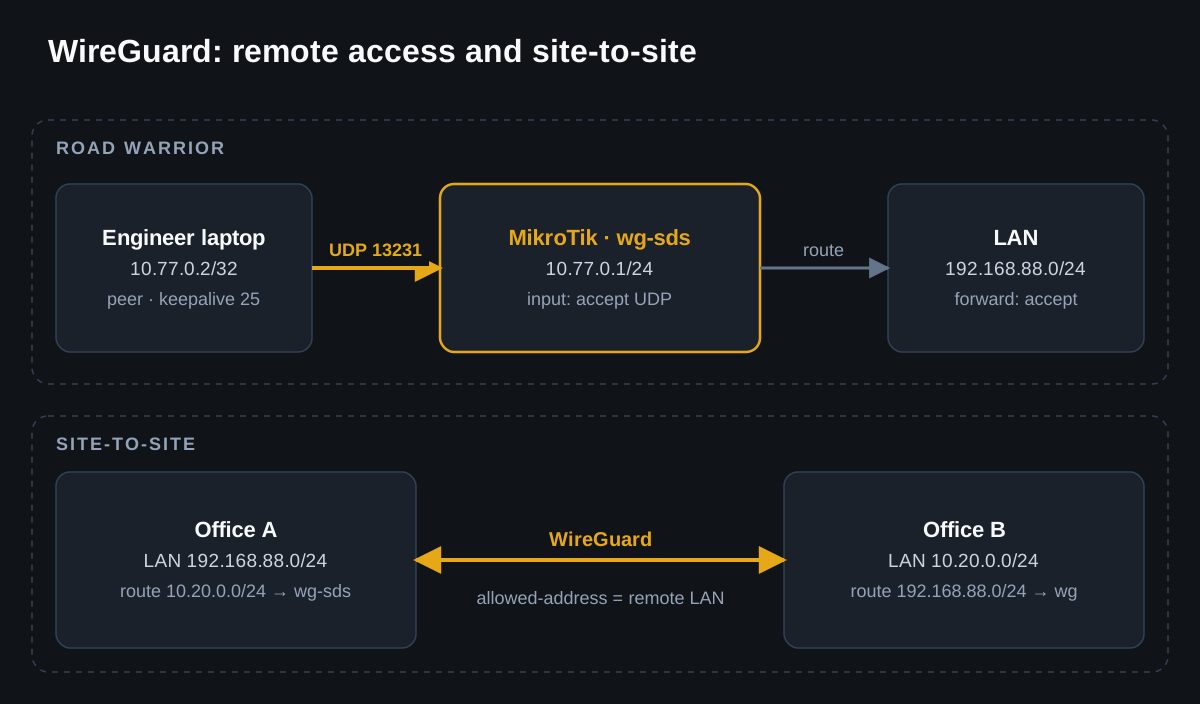
Common Mistakes
- leaving the same
allowed-addressin multiple peers; - opening the UDP port after the final drop;
- not adding a route to the remote subnet;
- losing the client's private key and being unable to restore the QR/config.